Variables, Builtin Functions, and Data Types in Python - How They Work and What They Do.
As part of Day 2 of the 30DaysOfPython GitHub repository, I’m writing about what I’ve learned so far—covering variables, built-in functions, and a basic introduction to data types.
For those who have just joined, welcome to my series on learning Python programming. I’m diving back into coding and software development. If you’ve come here to explore what we discover for Day 2 in the 30 Days Of Python course by Asabeneh1, we’ve got a lot to discuss.
Introduction to Variables in Python
To begin this post I’ll go on to talk about what I’ve learnt about Variables in Python. It’s important to know that the term variables is widely used between developers and it’s not strictly for Python alone - You will find variables used in almost all programming languages.
Variables act as placeholders for storing information. When you declare one, Python allocates a location in the computers memory to store data, which you can access using the variable name.
When creating a variable, we would use a principle to follow that helps create a variable name which is accepted by Python. This is known as naming conventions2.
Using Variables
By now we should have already gone over how to load a development environment on your device to start coding with Python.
If you haven’t yet installed both Python and VSCode, read this post: Introduction To Python
I’ll use actual code examples to show you how you can;
- Create a variable
- Store information in the variable
- Use that variable.
1
2
3
# Creating a variable:
number_1 = 5
number_2 = 5
This is the simplest way to create variables. We now have two variables storing integers (whole numbers) in our program.
We can now go on to use the variables number_1 and number_2 to perform functions or operations with them in our Python Terminal or VSCode.
Naming Conventions for Variables in Python
Before we go on further, I must explain the Python Naming Convention or rules. Some names are allowed while others will cause errors.
Here is a comprehensive guideline to creating a Python Variable with the right naming conventions being used:
- Must not start with a number
- Must not contain any special characters
- Can be alpha-numeric (letters & numbers) and have underscores
- Should represent or be named something relative to the information stored.
- Shouldn’t be a reserved word
Valid uses:
- num_1
- Num_1
- nuM_1
Invalid uses:
- 1_num
- 1&num
- 8$£%$5NUMBER
The naming convention we’ve used here is recognised as ‘snake case’. This is the method of creating a variable with underscores to separate each word in the name.
Another convention we could use is called ‘Camel Case’, where we would capitalise the first character of each word and join them using underscores like Camel_Case.
Note: When it comes to creating variables, always keep in mind of the built-in functions we have access to in Python as these also use ‘reserved’ words. It just means that using an existing functions name as a variable could cause errors throughout your program. Try be as unique as possible for all variable names.
Performing Functions
Now that I’ve learnt the basics of creating variables, I want to be able to build functions or use those variables to do something. For this, we’ll resort to using simple maths to get ourselves in the right direction.
In our Python script or terminal let’s go on ahead and use those variables by creating a small function:
1
2
3
4
5
6
7
8
9
# Creating a variable:
number_1 = 5
number_2 = 5

# Our function:
print(number_1 + number_2)

#Output:
10
There we have it!
That’s my first piece of code and it works well. There are a few nuances that I won’t explain just yet, as they’re covered later in the series.
The key takeaway here is that, we now know how to create a variable, store information in it, and use that data in a function.
The approach I’ve outlined here reflects the general way we structure our code. Even when working with more advanced concepts like classes and objects, we still start by defining things clearly before using them. Following Python’s programming logic, this is typically how code is written.
- Declare variables.
- Create functions that use those variables.
- Check the output and confirm.
- Refactor the code for improvements.
This might look something similar to what you have seen before when it comes to a Systems Development Lifecycle but we can use the analogy here in coding too.
What can we store in variables?
The topic goes on to succinctly explain what you can store using variables. What I found useful to think here was, anything.
A variable, at its core, serves the purpose of holding data or information. Therefore, we can store whatever we want.
You can create a variable to hold a unicorn - if you were able to physically do that but you get the gist.
With that said, though what you can store in a variable isn’t necessarily restrictive. I still need to know what we can store in there, which leads to the topic of Data Types.
What are Data Types?
In Computer Science, there are two umbrella terms for Data Types that we need to familiarise ourselves with3.
- Primitive Data Types (Basic)
- Abstract Data Types (Advanced)
At this point in time of my learning, I want to discuss with yourselves the first.
Primitive data types are the most basic, built-in types that a programming language provides that are single valued.
These are things like: Strings, Integers, Floats, Boolean, Lists and, Complex numbers.
- Integers
- These are whole numbers and can be either positive or negative.
- Strings
- Strings store text and can include letters, numbers, and special characters. Their primary purpose is often to display or output information, such as when using the
print()function. - To declare a string, we use string notation, which appears at the start and end of the text. There are a few different options, all serving the same purpose with slight differences:
- Single quotes:
'string here' - Double quotes:
"string here" - Triple quotes (used for multi-line strings):
"""Multi-line string here"""or'''Multi-line string here'''
- Single quotes:
- Strings store text and can include letters, numbers, and special characters. Their primary purpose is often to display or output information, such as when using the
- Floats
- Floats are numbers with decimal points and are used when more precision is required, such as in calculations or mathematical operations.
- Boolean
- Booleans represent truth values and can only be
TrueorFalse. They are often used to control conditions and logic within a program.
- Booleans represent truth values and can only be
1
2
3
4
5
6
#Example:
is_light_on = False
print(is_light_on)

#Output:
'False'
- Complex Numbers
- Complex numbers are used for more advanced mathematical operations, such as representing values on a graph. I’ll be learning about this later and it will have it’s own post.
- Lists
- Lists are exactly as described, they are a list of data types that you can store. There are 4 collection types that you can have; Lists, Sets, Tuples, and Dictionaries. We’ll be learning about lists, I believe on Day 5.
A concept called List Comprehension is explained in Day 13 of the course I am using, which will further dissect the lists topic/module.
Using Different Data Types
Now that I’ve learnt what the basic types of data are in Python. I want to now go on ahead and provide some examples of them.
This would help clear up a lot of information gaps, if I have left any, and will also help with understanding.
1
2
3
4
5
6
7
8
9
10
11
12
13
14
15
16
17
#Variables:

var_1 = 5
var_2 = '5'
# The difference in the two variables above,
# though they look to be storing the same data,
# is that one has an integer,
# the other has a string which is declared
# using string notation.

print(var_1 + var_2)
#Output:
#Traceback (most recent call last):
#  File "<python-input-2>", line 1, in <module>
#    print(var_1 + var_2)
#          ~~~~~^~~~~~
#TypeError: unsupported operand type(s) for +: 'int' and 'str'
The module in the course goes a little deeper than I have. However, I want to be able to explain the content in simpler terms. Here I have demonstrated to you that sometimes two different data types will not work with each other in certain functions.
By this point, we have reached our first error in our program. It’s a good idea to start learning about errors and error messages as these help you to debug code.
Let’s now take a moment to reflect on the different use cases we have for data types and how we would build with them.
Here is a very similar example to the course content, where I create different variables that store different data types and then use them all in functions.
1
2
3
4
5
6
7
8
9
10
11
12
13
14
first_name = 'Sheikh' #string
surname = 'Hussain'
age = 9743 # integer
is_learning_python = True # boolean
hobbies = ['Swimming','Learning', 'Coding'] # list
address = {
  'door_num': 97320,
  'street':'Yelander Street',
  'town':'Paper Town',
  'city':'Dorchester',         # dictionary
  'postcode':'YS15 1TD',
  'country':'UK',
}
You can go on ahead and do the same on your own Python script and play around with some of the data types. Try making your own or use different data types for each!
Let’s now go on ahead and start using a function with these variables we have created. The function we will use is type() which brings back the data type of the information stored in that variable.
The syntax to follow is type(variable) and when used with print() it then helps Python to produce the result in the terminal. E.g. print(type(variable))
1
2
3
4
5
6
7
8
9
10
11
12
13
14
15
16
17
18
19
20
21
22
first_name = 'Sheikh'
surname = 'Hussain'
age = 9743
is_learning_python = True
hobbies = ['Swimming','Learning', 'Coding']
address = {
  'door_num': 97320,
  'street':'Yelander Street',
  'town':'Paper Town',
  'city':'Dorchester',
  'postcode':'YS15 1TD',
  'country':'UK',
}

print(type(first_name)) #Output: str (string)
print(type(surname)) #Output:
print(type(age)) #Output: int (integer)
print(type(is_learning_python)) #Output: bool (boolean)
print(type(hobbies)) #Output: list
print(type(address)) #Output: dict (dictionary)
print(address['door_num']) #Output: 97320 - Again, don't worry on this, we'll learn more on it later
print(type(address['door_num'])) #Output: int
Now, when it comes to variables and data types, this is pretty much it. Again, there are some bits that are explained a little later in the course and some bits that require for me to do some additional reading like complex numbers. Primary focus for now is to go over the course content and write about them.
Before I close the topic there is one last element mentioned in this module, built-in functions.
What are built-in functions
Similar to primitive data types, Python has a large library of built-in functions that you can use without importing any libraries or modules.
By this point, I would say it’s not imperative that we learn all the functions there are. However, it’s a good idea to get a feel of what we have access to and what some of them do.
Visit 👉 Python’s Builtin Functions Documentation to get a list of all the functions
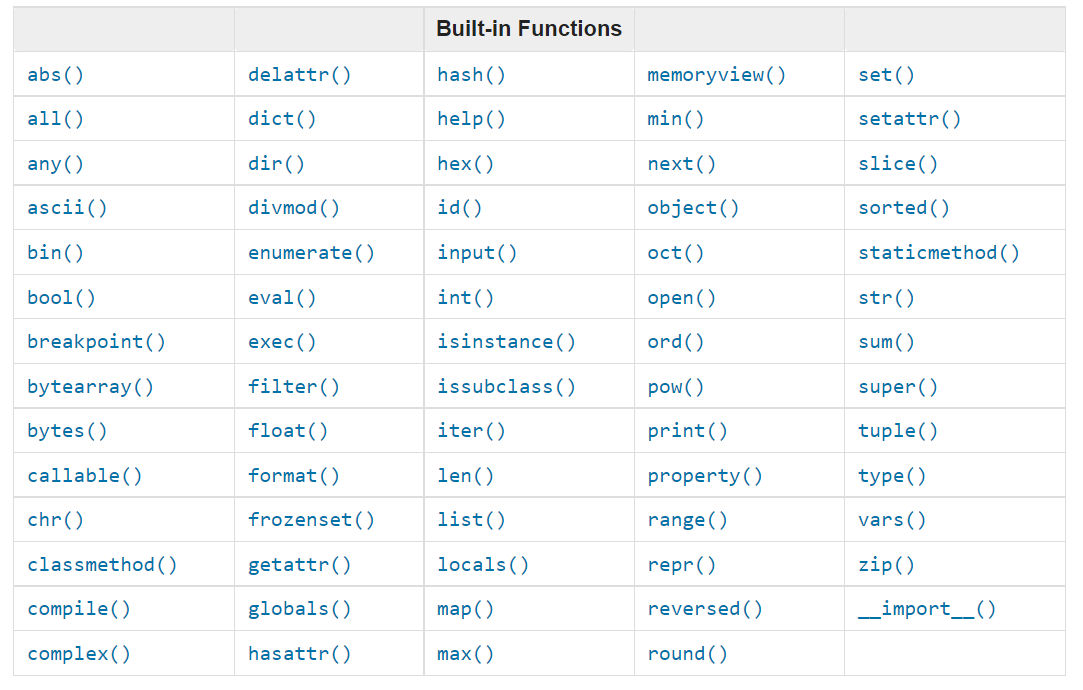 Image source: 30 Days Of Python: Day 2
To those who are new to coding, both print() and type() are some of Python’s built-in functions - that should help ease the nerve after seeing the list.
We’ll explore most of these functions through the rest of the series.
Summary
To summarise our learning in this post, we now know what Variables are, how to create them, and how to use them in a basic function. We also know what a naming convention is to help create good variable names going forward.
We have also learned about Primitive Data Types and what they are. Finally, we have also gone over some basic functions which used our variables and data types that we created earlier.
Needless to say, I have done this course a number of times and as a reader, depending on your experience level, I would request that you tell me how I did with this post so that I can improve it.