APIs (Application Programming Interfaces) – Understanding HTTP and CRUD Operations
In this learning journal, I explore how APIs work, how HTTP requests and responses are structured, and how these concepts connect to real-world applications. From understanding headers and status codes to filtering data and mapping CRUD operations, I reflect on my journey learning how web systems communicate behind the scenes.
What Is an API?
You can think of an API as being a method that allows two separate systems to communicate with each other. The API is what allows the system/software to automatically send and receive requests.
A more detailed example would be to think of services like weather applications, delivery updates, or mobile application requests. In all these examples, the application doesn’t store data and instead uses another system for data handling.
There are many types of APIs and they all have some specific uses, here is a list of all API types: | API Type | What It’s Used For | Key Characteristics | How Common It Is | Typical Use Cases | | —————– | ——————————————— | ——————————————————————- | —————————– | ——————————————– | | REST | Sharing data between systems over the web | Stateless, resource-based URLs, JSON data, uses GET/POST/PUT/DELETE | Very common | Web apps, mobile apps, public services | | SOAP | Highly structured and secure data exchange | XML-only, strict rules, built-in security standards | Less common (legacy) | Banking, government, enterprise systems | | GraphQL | Fetching only the exact data required | Single endpoint, flexible queries, strongly typed schema | Common (modern apps) | Dashboards, frontend-heavy apps | | RPC | Executing remote functions or actions | Function-based calls, simple request/response model | Uncommon | Internal services, legacy systems | | gRPC | Fast communication between backend services | Binary format, HTTP/2, strongly typed contracts | Common in large systems | Cloud platforms, microservices | | WebSocket | Real-time, two-way communication | Persistent connection, low latency updates | Common for real-time apps | Chat apps, live feeds, online games | | Streaming API | Sending continuous streams of data | Event-driven, real-time data flow | Moderately common | Video/audio streaming, analytics | | Public API | Allowing open access to a service | Public documentation, API keys, rate limits | Very common | Weather, maps, social media | | Private API | Internal communication within an organisation | Restricted access, internal use only | Very common | Backend services, internal tools | | Partner API | Controlled access for trusted third parties | Authentication, limited permissions | Common | Payments, shipping, third-party integrations |
Built with ChatGPT
Introduction to HTTP
To deepen my understanding of APIs, I took to contemplating about what I had learnt on HTTP and how a request is made over the web and received. HTTP defines how information is relayed between a client (system, application, or browser) and a server.
Whenever we visit a website or search for something online or in a website, our browsers are sending a HTTP request with the information we want and the server is what replies with a HTTP response containing all the information.
HTTP Requests
This is what a basic HTTP request looks like:
1
2
3
4
GET /students HTTP/1.1
Host: example.com
Accept: application/json
...
From this, I can identify:
GET - the HTTP Method (requesting data) /students - the resource being requested HTTP/1.1 - the HTTP protocol version Headers - extra information about the request
This request is asking the server to return a list of students in JSON format.
What are HTTP Methods
HTTP Methods will seem very similar to database CRUD (Create, Read, Update, Delete) operations, and that’s with intent. Each CRUD operation works with an HTTP method to ensure the action is performed correctly.
Here is a mental map that I can use to grasp the concept:
GET - Read data (Read) POST - Create new data (Create) PUT - Replace existing data (Update) PATCH - Update part of existing data (Update) DELETE - Remove data (Delete)
HTTP Responses
When a server sends a response, it typically includes:
- A status code (200, 404, etc.)
- Headers
- A response body (the actual data)
Here’s an example of an HTTP response:
1
2
3
4
5
6
7
HTTP/1.1 200 OK
Content-Type: application/json

[
  {"name": "Sheikh Hussain", "grade": "C"},
  {"name": "John Doe", "grade": "B"}
]
The key information presented here is the HTTP/1.1 200 OK part, as this includes the status code. I’ve already discussed what all the status codes are in another post, but 200 OK means the request was successful.
Understanding HTTP Headers
HTTP headers are metadata on the request or response made. Think of them as additional bits of information that explain how the data should be handled.
Here are some:
Host - which server is being contacted Accept - what type of data the client expects Content-Type - what type of data is being sent back
There are many more that I could include, but this is enough.
A More Granular Example
The earlier example of an HTTP request was made for a whole collection/table of data. What if we wanted specific information from the server?
Think about the time when we use search filters on sites and how they produce a list of results. For that, the HTTP request is made to be more detailed.
Get all the students’ names and age fields who got a grade C:
1
GET /students?grade=C&fields=name,age HTTP/1.1
A Realistic HTTP Request Example
To make sure I understood all about HTTP requests and responses, I wanted to include an actual example that was placed in the course contents. This should give a better idea of what an actual request should look like.
1
2
3
4
5
6
7
8
9
10
11
12
13
14
GET / HTTP/1.1
Host: thirtydaysofpython-v1-final.herokuapp.com
Connection: keep-alive
Pragma: no-cache
Cache-Control: no-cache
Upgrade-Insecure-Requests: 1
User-Agent: Mozilla/5.0 (Macintosh; Intel Mac OS X 10_14_6) AppleWebKit/537.36 (KHTML, like Gecko) Chrome/79.0.3945.79 Safari/537.36
Sec-Fetch-User: ?1
Accept: text/html,application/xhtml+xml,application/xml;q=0.9,image/webp,image/apng,*/*;q=0.8,application/signed-exchange;v=b3;q=0.9
Sec-Fetch-Site: same-origin
Sec-Fetch-Mode: navigate
Referer: https://thirtydaysofpython-v1-final.herokuapp.com/post
Accept-Encoding: gzip, deflate, br
Accept-Language: en-GB,en;q=0.9,fi-FI;q=0.8,fi;q=0.7,en-CA;q=0.6,en-US;q=0.5,fr;q=0.4
I haven’t explored all the header metadata information just yet, but most of them do seem self-explanatory.
What Happens Before a Response is Sent?
I wanted to include this topic as being or forming part of this module in the course, as this information helps to comprehend the information better. Before an HTTP request is made from the client to the server, a connection must be created.
This is done using what is known as a 3-way TCP Handshake. Before I explain a TCP handshake, I would also have to also go over what TCP/IP is.
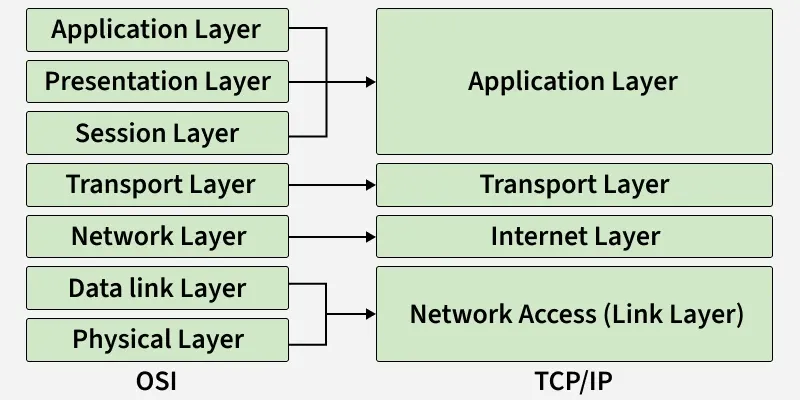
In computer networking, we come across the term TCP/IP, which illustrates what the different layers within a network are. We also learn about OSI model, which is often described as being an extension to the TCP/IP model.
TCP/IP and OSI Model
Before any communication is sent over a network, there are protocols set in place to ensure all information is sent and received reliably. It’s important to understand this information as it helps later.
Each layer performs a set of instructions on the data or network and then sends out the data as packets.
Here is an image that describes both models, if you’d like to learn about the OSI and TCP/IP models, I would recommend visiting the web. I want to stay on topic for my posts.
3-Way TCP Handshake
At a high-level, during the TCP/IP or OSI protocols a sub-request is sent to the server to ensure that the server is okay to receive a request and send a response. This is often where you would come across server timed out errors.
All that happens is, the client sends a synchronise request, receives a synchronise and acknowledge response, and sends back an acknowledge is sent from the client back to the server.
This diagram should help with visualising the concept: 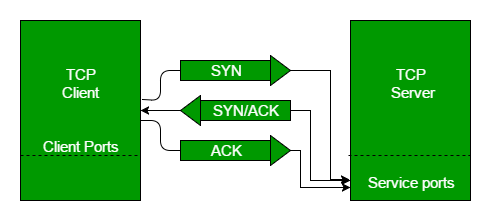
This is a topic for another time, but it can get very in-depth and I would suggest consuming as much content as possible on this to get the complete picture.
Summary
With all that discussed, that sums up today’s work. I know it seems less practical and more theoretical for a change; however, it’s good information that we can think on when brainstorming on how your everyday browser and applications work.
This insight alone promotes creative thinking for me as it starts to highlight how data is being sent and received, and what types of data are available. I should keep in mind here that while I have been discussing the majority of my examples around database queries, we use the same methods to send and receive images, videos, documents, and many other file formats.
To include some more interesting information, when we play video games over an online server or have a video call with someone. We don’t use the 3-way handshake, and instead we use a UDP, which just send the information in a stream-like form.